A reverse email lookup takes an email address and finds the people and accounts linked to it. Investigators check which platforms the address is registered on, then collect the names, profile photos, usernames and locations those accounts show publicly. Tools like OSINT Industries check hundreds of sources in real-time from one search.
Skip the manual steps. Run a reverse email lookup in OSINT Industries.
Search NowTable of contents
- What a reverse email search can reveal
- Before you search: read the email itself
- How to look up an email address for free
- How to do a reverse email lookup with OSINT Industries
- How to read the results
- Reverse email lookup tools compared
- Where to go next: pivoting from an email
- Case study: investigating a fake recruiter
- Is reverse email lookup legal?
- FAQs
What a reverse email search can reveal
An email address gives you something to go on. A reverse email search can uncover valuable intel associated with that email address, including public profiles, usernames, locations, and other interesting snippets of info. The results depend on the address, the sources available, and the privacy settings of the services involved.
Let’s explore what an email lookup could return:
Not every reverse email search will return all these details. Some addresses might be a goldmine. Others might be a dead-end.
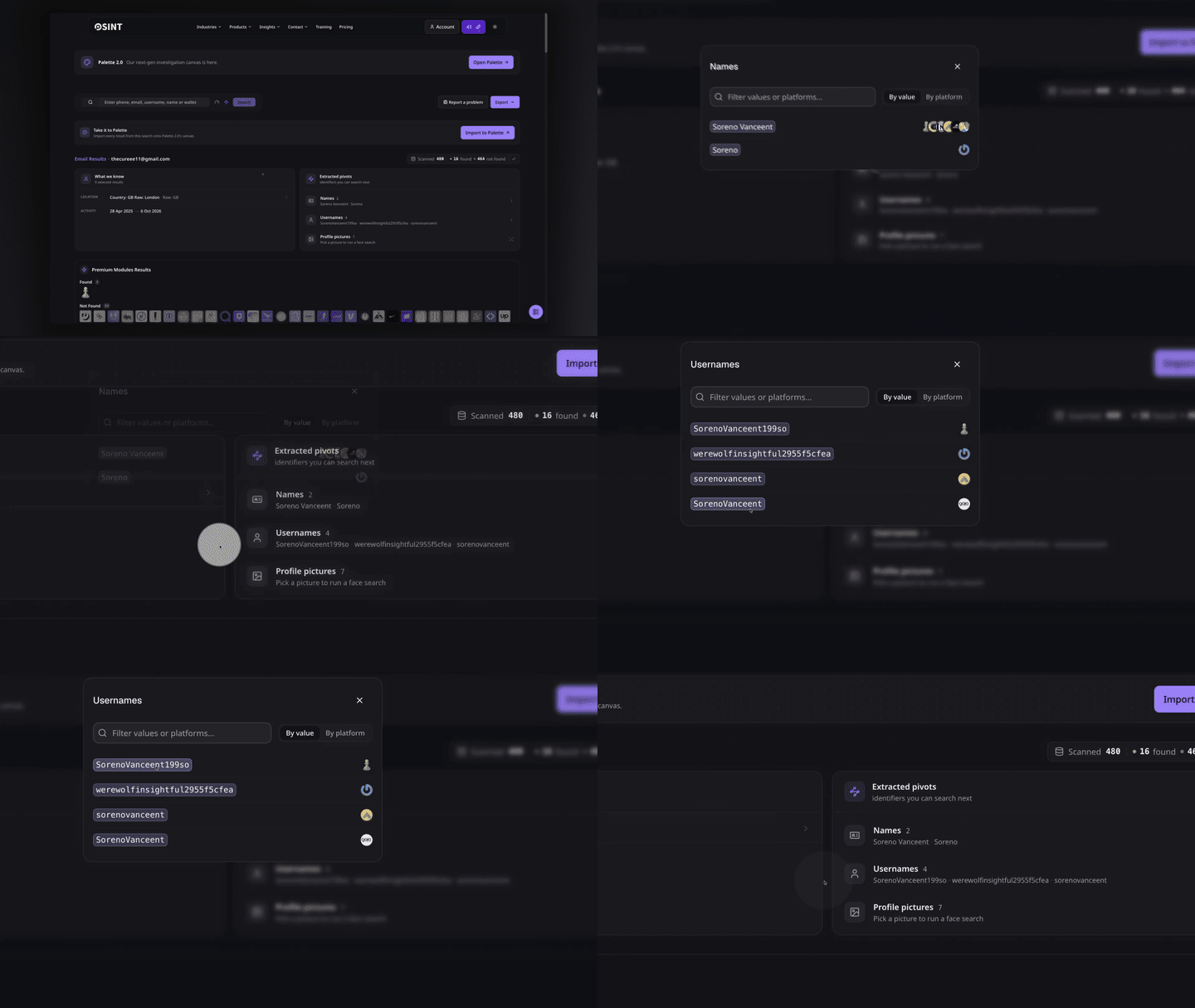
For example, thecureee11@gmail.com might lead to a professional profile and an old gaming account. These results give you places to investigate but they don’t prove the accounts belong to the same person. Verify important details independently.
Before you search: read the email itself
Before you perform a reverse email lookup, start by checking the address. Its domain and naming pattern can help you decide where to look.
Check the domain
The domain is the part after the @ symbol. E.g. In janedoe.test@example.com, the domain is example.com.
Lookout for three common types:
- Corporate domains: These may indicate a business affiliation. Check the domain against the company's official website.
- Free webmail: Services such as Gmail and Outlook let people create accounts without proving a business affiliation.
- Disposable email: Temporary inboxes can protect privacy, but they may also appear in spam investigations.
Watch out for lookalike domains. A sender might add a word, change a letter, or use a different domain ending to imitate a legitimate business.
Use ICANN Lookup to check available domain registration information.
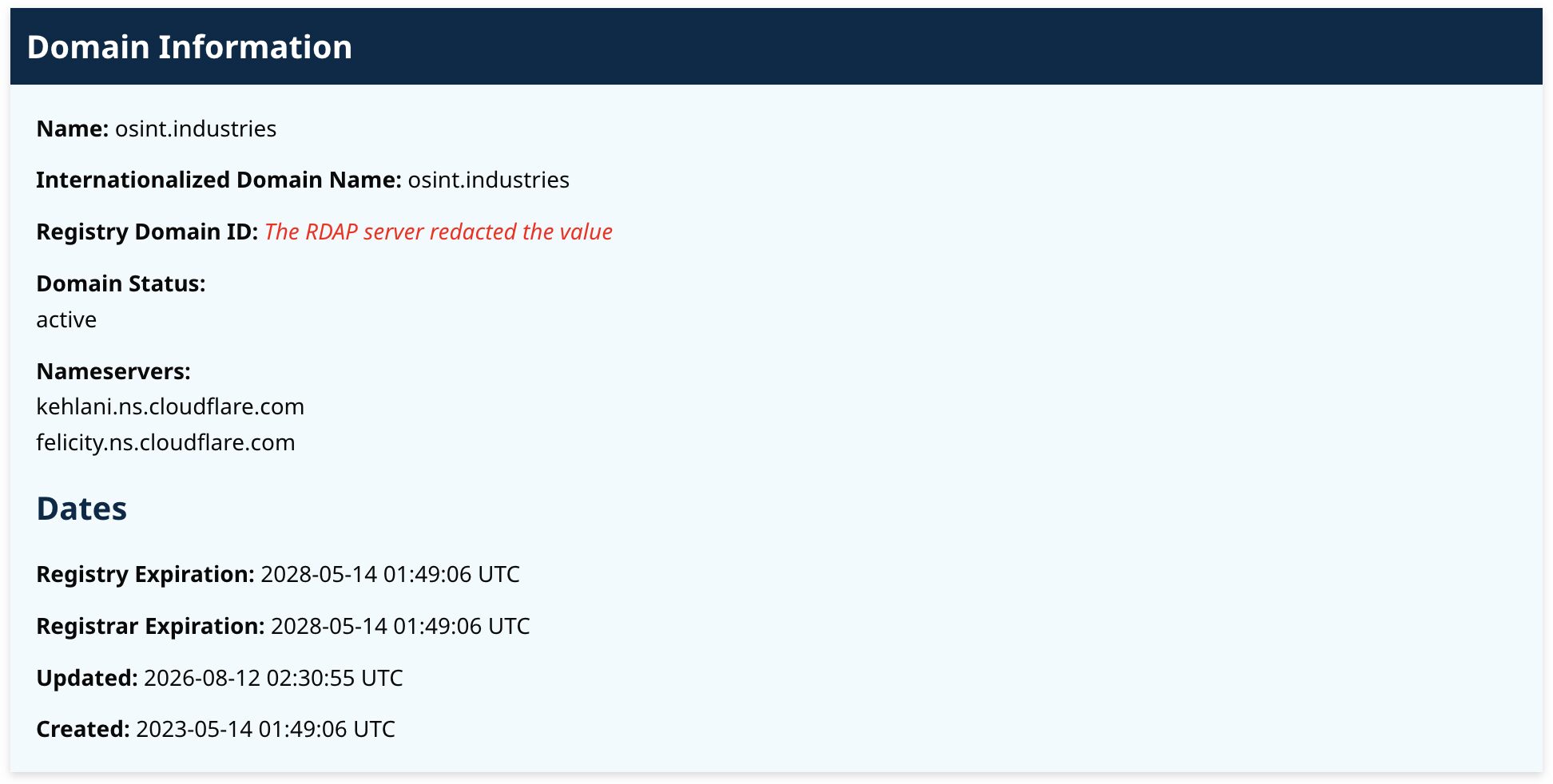
Note: Privacy protection may hide the registrant, and domain registration alone does not identify the person who sent an email.
Check the naming pattern
Compare these fictional examples:
- janedoe.test@northstar-example.co.uk
- jdoetest1989@outlook.com
- recruitment.team.test482@protonmail.com
The first looks like a work address. The second could be a personal account. And the third sounds like a recruitment account, but its name does not prove that the sender is a recruiter.
Look for spelling differences, unusual numbers, and inconsistencies between the address and the sender's claimed identity. Remember that legitimate users also rely on aliases and personal email accounts.
Inspect the email headers
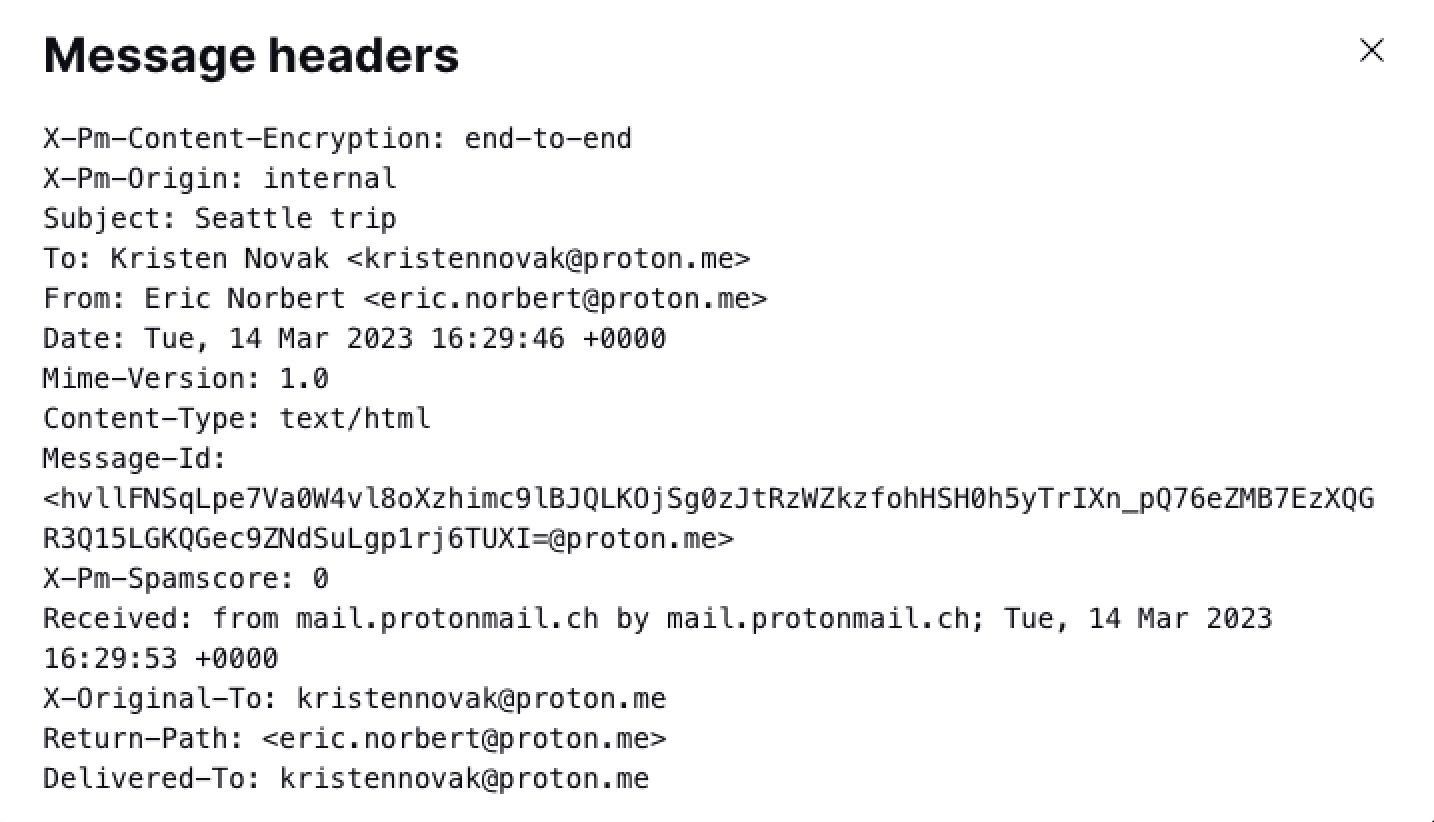
If a message looks suspicious, inspect its full headers. They can show mail servers, routing information, timestamps and authentication results such as SPF, DKIM and DMARC.
Some headers contain IP addresses, but these do not necessarily reveal the sender's physical location. The address may belong to a mail provider, VPN or corporate network.
How do you actually inspect email headers?
The option is usually called "Show original," "View source" or "View message details," depending on your email provider. It reveals the technical information behind the message.
For example, in Gmail:
- Open the email.
- Click the three-dot menu next to the reply button.
- Select Show original.
- Look for the authentication results and the technical details in the header.
For more detail, see our guide on email header analysis.
How to look up an email address for free
Free sources can be your go-to when performing an email lookup (if you search carefully and compare your findings.)
Start here:
Search engines and exact-match operators
To search someone by email, begin with the complete email address in quotation marks:
“jane.doe.test@example.com”
Try relevant variations:
- “jane.doe.test@example.com” profile
- “jane.doe.test@example.com” LinkedIn
- “jane.doe.test@example.com” forum
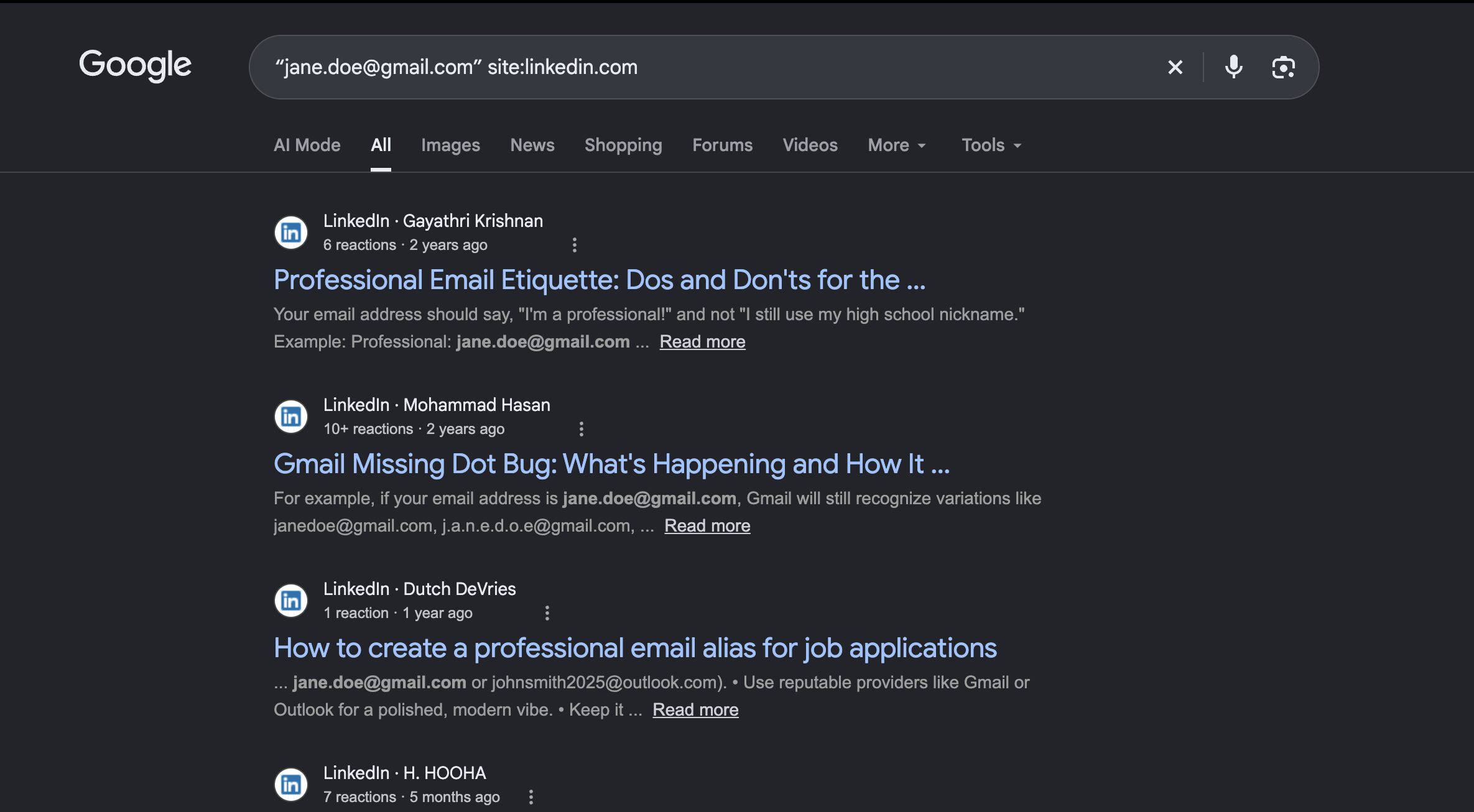
You can also narrow your search to a website:
“jane.doe.test@example.com” site:linkedin.com
Search engines may return public profiles, forum posts, documents, or old references. If results come up blank, that doesn’t mean the address has no associated accounts. Many platforms restrict email discovery or prevent search engines from indexing profiles.
Check Gravatar and public key directories
Gravatar lets users associate profile information and avatars with email addresses. You might uncover a profile or image, depending on the available information and the user's settings.
Treat a match however as a clue. People can use nicknames, old photographs, or different identities online. (Think: catfish!)
You can also check keys.openpgp.org for public encryption keys associated with email addresses. This can help when an address is used for public encryption, but most people will not have a relevant key listed.
Check breach exposure
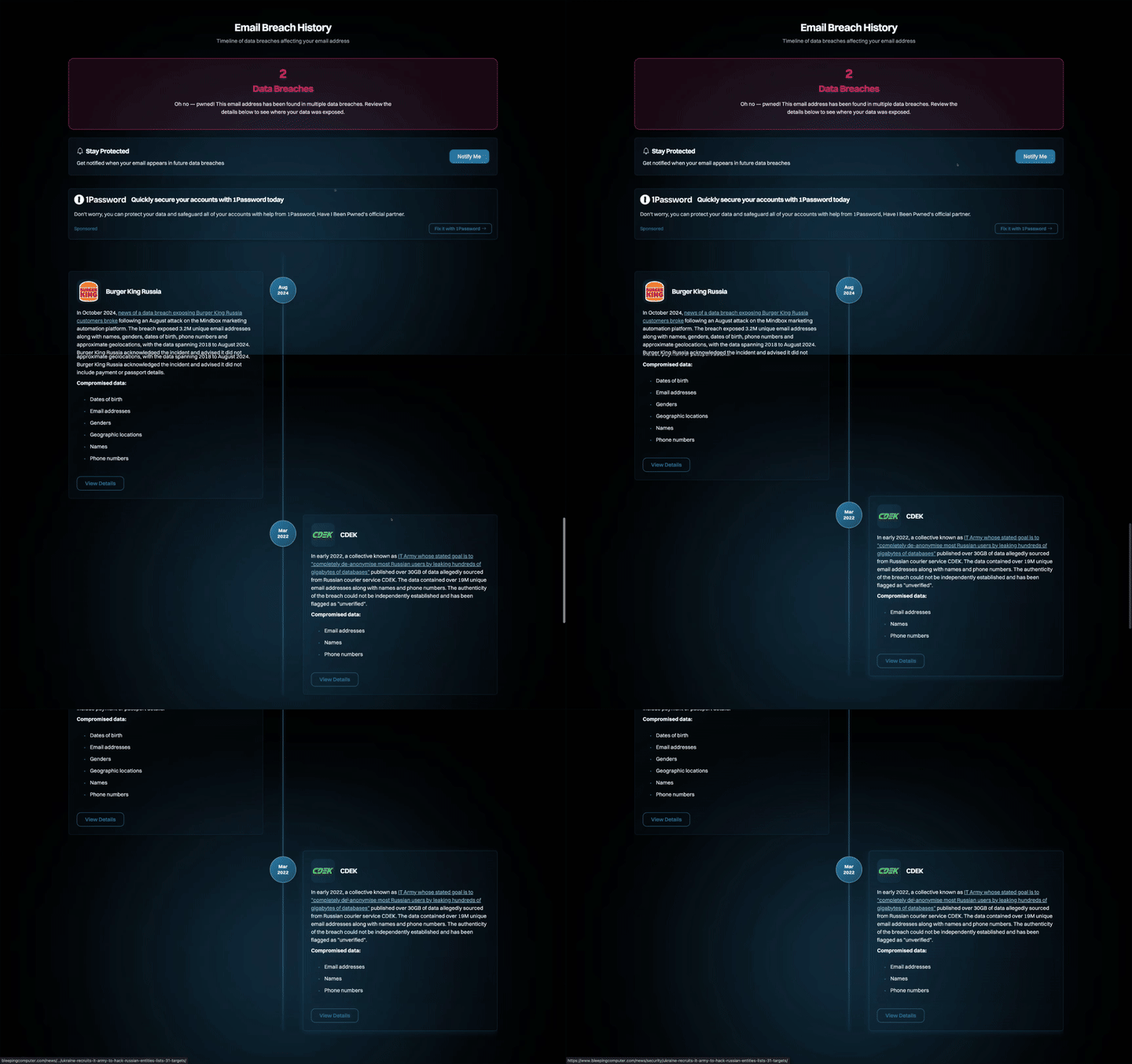
Have I Been Pwned lets you check whether an address appears in known data breaches covered by its service.
A match may reveal that information associated with the address was exposed in a particular incident. But it doesn’t prove that the account is currently compromised or that the owner was responsible for the breach.
Important Note: Never use leaked passwords to attempt access to an account.
Check platform contact discovery
Some platforms offer official ways to find accounts through contacts or email addresses, although many restrict these features or limit the information they return. A good place to start is the platform's built-in search or contact-sync feature. You can also try searching the email address directly within the platform, as some users include it in their public profile or posts.
Due to privacy concerns, data scraping, and online abuse, this may not be possible. In the past, it was way easier to enter an email address and find the account linked to it. But that also made it easier for people to identify users who hadn't chosen to make that connection public.
Use the platform's own search options and follow its rules. Don’t create fake accounts or bypass privacy settings to obtain information.
Where free methods stop
Free searches work well for simple questions, but they can be slow and limited. You often have to check one platform at a time, repeat searches across different websites, and piece together the results yourself. Some accounts may not show up at all, and older or deleted information can be difficult to find.
Free methods also rarely give you a clear timeline or a map of connections, so working out how different findings relate to each other takes extra effort.
If you're digging into several email addresses or comparing information across multiple sources, a dedicated OSINT email lookup tool may save you time (and your sanity!) It can help bring relevant findings together in one place without drowning in multiple tabs and sticky notes.
How to do a reverse email lookup with OSINT Industries
With OSINT Industries’ user-friendly platform, searching for someone by email is simple. Let’s take a look at how to run a reverse email lookup, step by step, and show how you can make the most of your results.
Step 1: Access OSINT Industries
Visit the OSINT Industries website and login to your account. If you don’t have an account yet, you can sign up here and create one. You can also sign in with an existing Google Account. Once you’re logged in, you should be able to see our OSINT platform and search bar.
Step 2: Enter your target email address
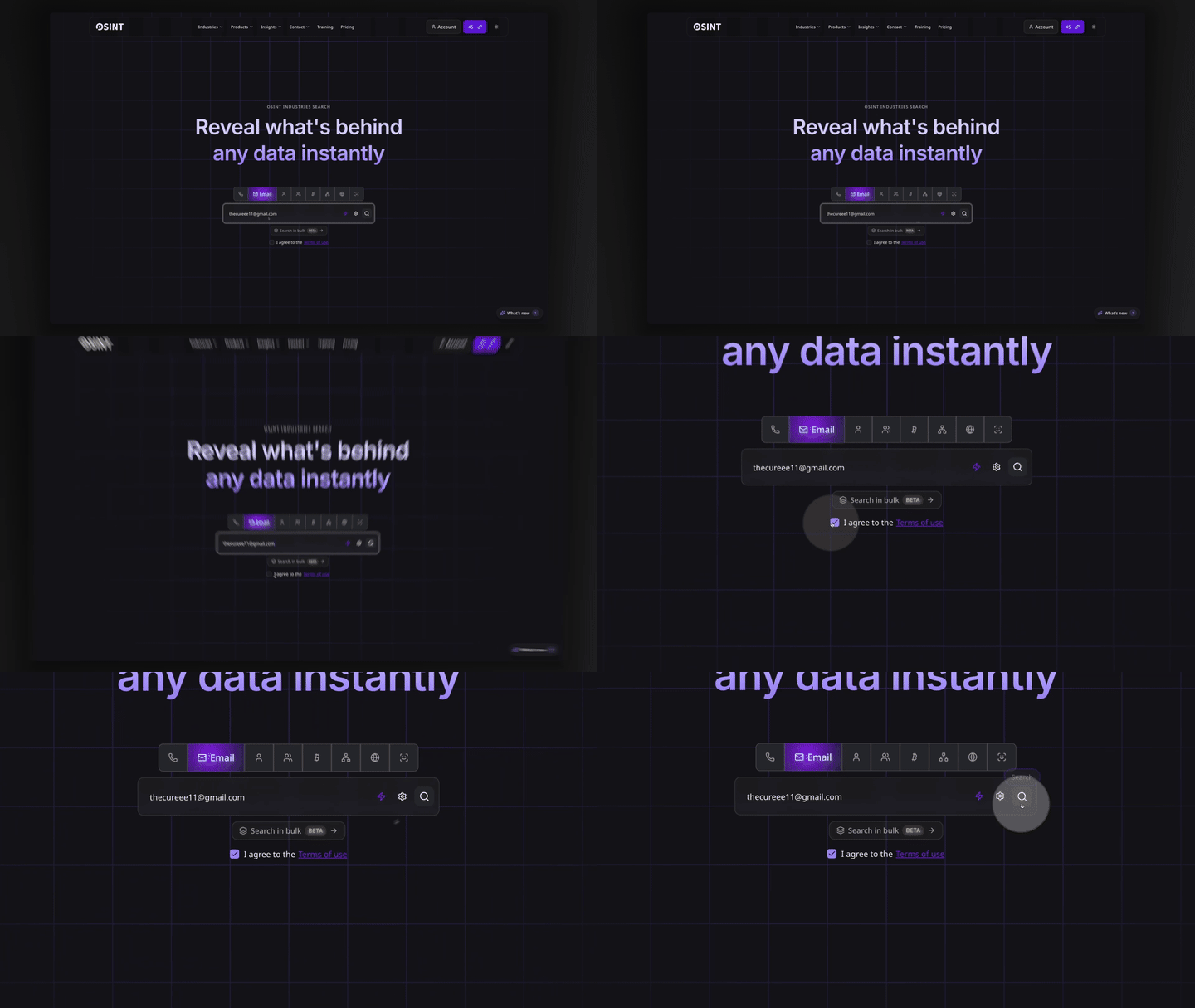
Enter the full email address into the search bar, selecting the ‘email’ option.
For example, jane.doe.test@protonmail.com
Double-check the address before moving on. Even a small typo can affect your results.
Step 3: Agree to the terms and hit search
After entering the email, agree to our Terms of Use (and give them a read if you fancy). Press enter or hit the ‘search’ icon, and let our platform do its thing.
Step 4: Run the search
Twiddle your thumbs for a few seconds and watch the available results of your reverse email lookup stream in.*
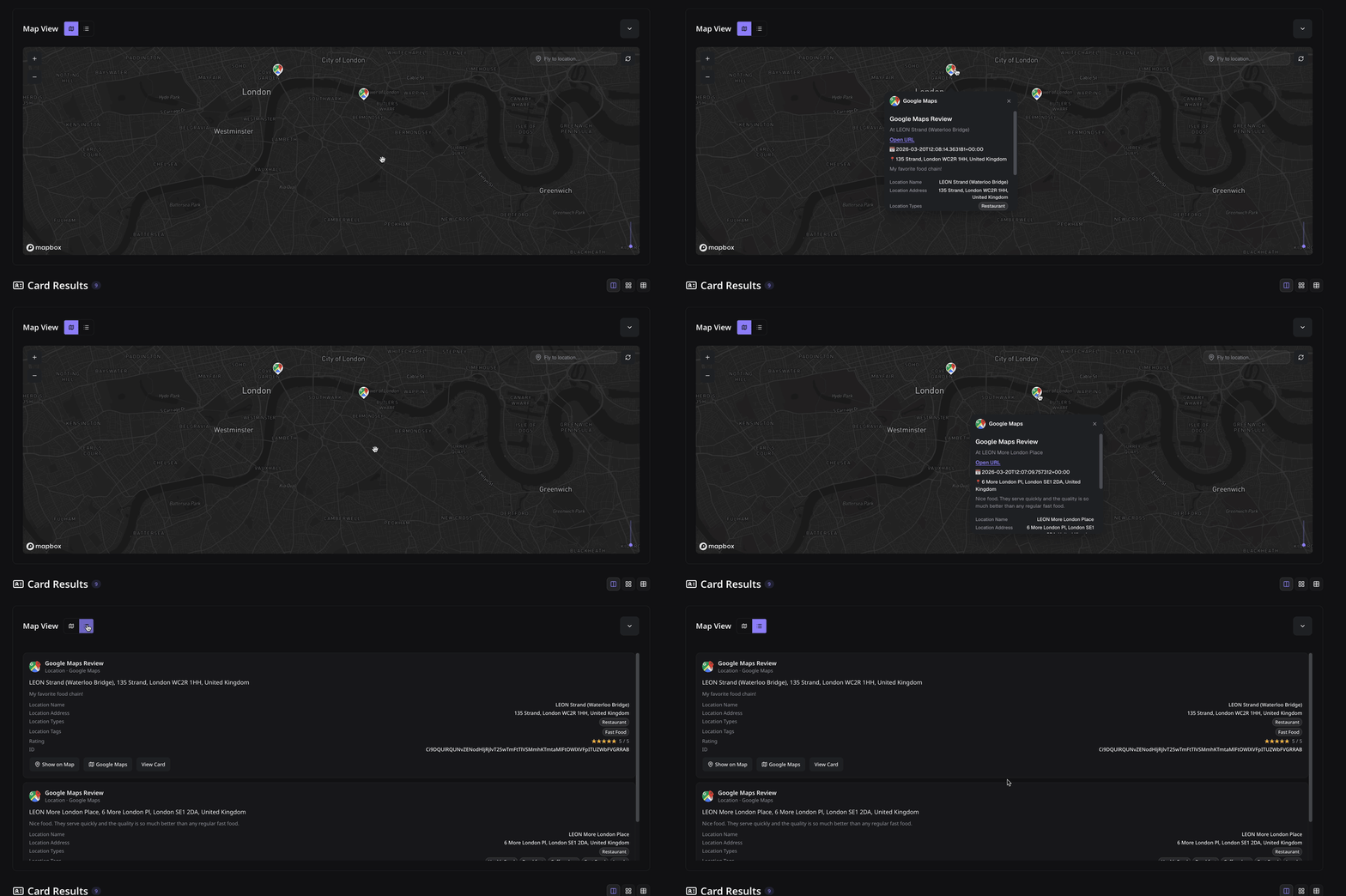
You’ll see a detailed report featuring social media profiles, account links, profile pictures, blockchain activity, GeoINT, breached data, and much more. You can also view results on a timeline or via a map.
*You may receive several results, limited information, or no matches.
Step 5: Explore the results
Check the available account references, usernames, display names, and other relevant intel.
Focus on info that helps answer your original question and look for connections between your findings. Don’t assume all returned accounts belong to one person.
Step 6: Review and corroborate your findings.
Before wrapping up, take a closer look at what you’ve uncovered. Cross-check relevant details, compare information across sources and look for evidence that supports or contradicts your findings.
Corroborating details across multiple sources can help you build a more accurate picture and avoid jumping to conclusions.
Step 7: Export data
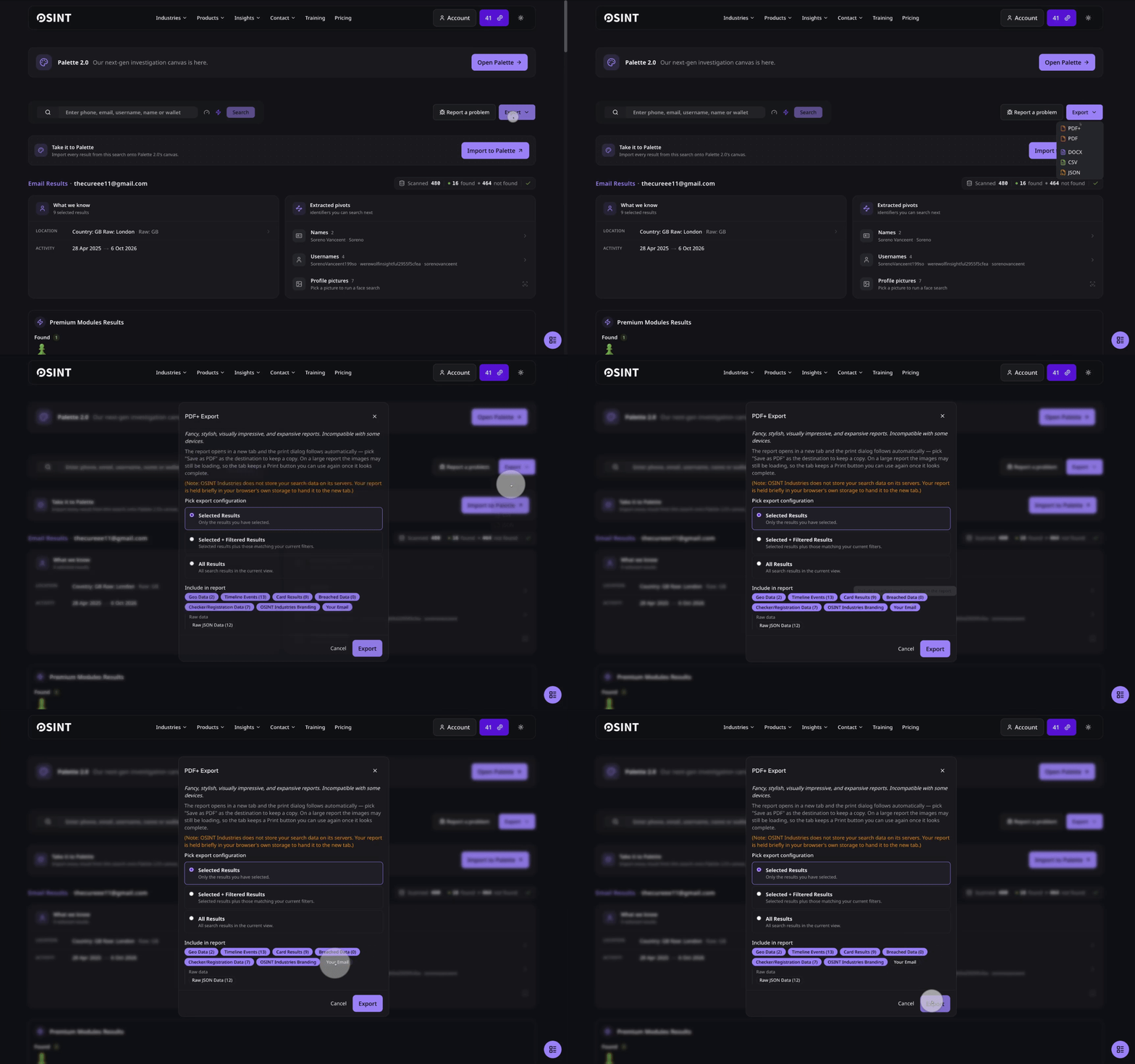
Once you’ve finished analysing the results of your reverse email lookup on-site, you can export your findings via PDF, DOC, EXCEL or JSON.
From there, it’s over to you. Just remember to use your findings responsibly.
How to read the results
Just because you’ve found an account doesn’t mean you know who’s behind it. You need to assess the evidence…
Check the account age
A recently created account may prompt further investigation if the sender claims a long professional history.
For example, a recruiter who claims five years of experience may have a professional profile created only three weeks ago. Whilst that might instantly raise eyebrows, it’s a discrepancy to check, not automatic proof of fraud.
Compare profile photos
The same photograph on two accounts may support a connection, but it could also have been copied.
Check where the image appears and whether other details match. But do not use a photograph alone to establish someone's identity.
Look for signs of a burner address
A burner address is often used for a short period or for a specific purpose.
Here’s a few red flags to look out for:
- Little verifiable public history.
- A claimed professional identity that cannot be confirmed.
- A mismatch between the sender's domain and the organisation's official domain.
- Inconsistent names or usernames.
- Requests for money or sensitive documents under pressure.
One red flag on its own doesn’t necessarily mean something is wrong. Look at the bigger picture and weigh up all the available evidence before drawing conclusions.
Separate facts from assumptions
Not every search result tells the whole story, so don’t jump the gun when conducting an email lookup. An email address listed on an official company website supports a connection, but it’s still worth checking that the page is genuine. Finding the same username across two profiles might suggest a link, but compare other details before drawing conclusions.
An account that appears to have been created recently can offer useful context, but it doesn’t tell you everything about its history. Likewise, finding no public accounts doesn’t mean there’s nothing to find, it simply means your search hasn’t uncovered any. If someone is pressuring you to make an urgent payment, verify their identity through an independent channel before taking action.
The key is to distinguish what you know from what you suspect.
Reverse email lookup tools compared
Real-time behaviour, available fields, dates, mapping and search retention vary by provider. Verify the current product features and privacy policy before choosing a reverse email lookup tool.
A dedicated tool can rapidly reduce manual work, but don’t forget to verify your findings independently.
Where to go next: pivoting from an email
It’s time to connect the dots!
Pivoting is all about using one useful clue to explore another lead. It helps you follow the trail and focus on what matters, without getting sidetracked by every detail you uncover.
Pivot to social media
If your email search returns a public profile, compare its details with the sender's claims. Look for consistent professional information and links to official websites.
Find out more in our guide on social media search.
Pivot to a username
The part before the @ can be a useful starting point. For example, jane.dot.test might also appear on a public forum or profile.
The same username does not guarantee the same identity.
Pivot to a phone number
If the sender includes a number, compare it with the organisation's published contact details. Just bear in mind that numbers can be recycled or spoofed.
Read our guide on phone number lookup.
For a broader investigation framework, visit our OSINT guide.
Case study: investigating a fake recruiter
This fictional example shows how an investigator might assess a suspicious recruitment email.
The initial message
Amy receives an email from someone called Tom Reed, who claims to recruit for a fictional company named Northstar Digital.
The sender offers a remote job but asks Amy to submit identity documents before an interview. He also says she must act that day.
Amy (sensibly!) decides to check the claim first.
The investigation
First, she checks the address. The sender uses tom.reed.test@protonmail.com rather than an address on the company's domain. Alarm bells may be ringing at this point, but it’s not yet proof of fraud.
Next, she searches the address. A reverse email lookup suggests the email address was created just three weeks ago, and Amy can’t find a LinkedIn profile to back up the sender’s professional claims. She also spots a public forum account using the same username, tomreedtest. It’s an interesting lead, but she makes a note to investigate further rather than jumping to conclusions.
Then, she checks the company. Amy finds the company's website independently and checks its careers page. The vacancy is not listed, and the published recruitment contact does not match the sender's address.
Finally, she reviews the forum result. The fictional account discusses a recruitment scheme involving upfront equipment fees, which sounds very similar to what’s happening here. It’s another warning sign, but just because the usernames match doesn’t mean the account definitely belongs to Tom.
The outcome
Amy spots a few red flags: the sender’s professional claims don’t check out, there’s no sign of the advertised job, they’re asking for sensitive documents, and they’re rushing her to act.
Rather than taking the bait, Amy holds off on sending her documents or paying any fees. She heads to the company’s official website to check things out for herself. In this fictional example, the company confirms that the email didn’t come from them.
Amy reports the email through the appropriate channels.
The takeaway? An email lookup can point you in the right direction, but it’s up to you to verify the details before deciding what they really mean.
Is reverse email lookup legal?
Reverse email lookup is not automatically illegal. The legal position depends on your purpose, the information you collect, how you obtain it, and how you use it.
Remember: publicly accessible information can still be personal data.
Have a legitimate purpose
Reasonable purposes may include checking a suspicious message, verifying a business contact, or investigating impersonation.
If UK data protection law applies, consider the UK GDPR and Data Protection Act 2018. The Information Commissioner's Office guidance on lawful basis explains the requirements for processing personal data.
Legitimate interests are not blanket permission to investigate anyone. You must consider necessity and balance your interests against the individual's rights and freedoms.
Keep your investigation proportionate
Collect only the information you need.
If you want to verify a recruiter, checking the email domain, company directory and vacancy may be enough. You don’t need to build a detailed profile of the person's private life, however tempting that may be.
Respect privacy and access controls
Do not bypass private account settings, use leaked credentials, or impersonate someone to obtain information.
Check platform terms, secure your notes, and avoid publishing allegations based on unverified matches. Retain information only as long as necessary.
Disclaimer: This section provides general information, not legal advice. Organisations conducting investigations should seek appropriate legal or data protection guidance.
FAQs
Can I find out who owns an email address for free?
Sometimes. Search the complete address, check public profiles, and use reputable breach-checking services. You may find a name or account, but many addresses have little public information. Free searches cannot guarantee you’ll identify the owner.
Will the person know I searched their email?
A search of public web pages doesn’t usually directly notify the person. However, some platforms log activity or trigger notifications. Check the service's privacy policy before searching, and don’t assume every lookup is anonymous.
How do I find someone's social media with their email?
Search the complete address in quotation marks and review public results. Compare any returned profile against independent information. Platform privacy settings may limit your findings, and a matching username or photograph does not prove account ownership.
What is the best reverse email lookup tool?
It depends on your needs. Search engines are a useful free starting point. Have I Been Pwned checks known breach exposure. OSINT Industries may help you investigate multiple supported sources in one workflow.
Can I trace an email to a location?
Sometimes you might find location details linked to an email address through a public profile. Email headers can also reveal technical information about how a message was routed, but don’t expect an exact location. An IP address might point to a mail server, VPN, or corporate network rather than the sender’s actual whereabouts.
Find who's behind an email address
A reverse email lookup can help you connect an address with public accounts and other useful information. The key is to verify the results instead of assuming that every match is accurate.
Start with the basics: check the email domain, look for public profiles and follow up on any promising leads. If you want to bring findings from multiple sources together, a dedicated OSINT tool like OSINT Industries can help streamline your search.
Find who’s behind any email address